

Dell PowerEdge R650
The Dell PowerEdge R650 server is a 1U, 15th Gen (15G), dual-socket, Intel-based rack server, which can weigh up to 47Lbs when fully configured, and is designed to run complex workloads in a data center environment. The server's motherboard supports 2x Intel LGA4189 sockets that accommodate Intel's 3rd Generation Xeon Scalable Series processors (Ice Lake CPUs – based on Intel’s Sunny Cove architecture) with a maximum TDP of 270W per CPU, maximum speed per processor of 3.60Ghz, and a maximum of 80x cores with 2x processors installed. The Dell PowerEdge R650 server supports 16x DIMMs per CPU for a total of 32x RAM slots and a maximum of 8.2TB of PC4 / DDR4 ECC-Registered memory that runs at up to 3200 Mhz.
Select a Dell PowerEdge R650


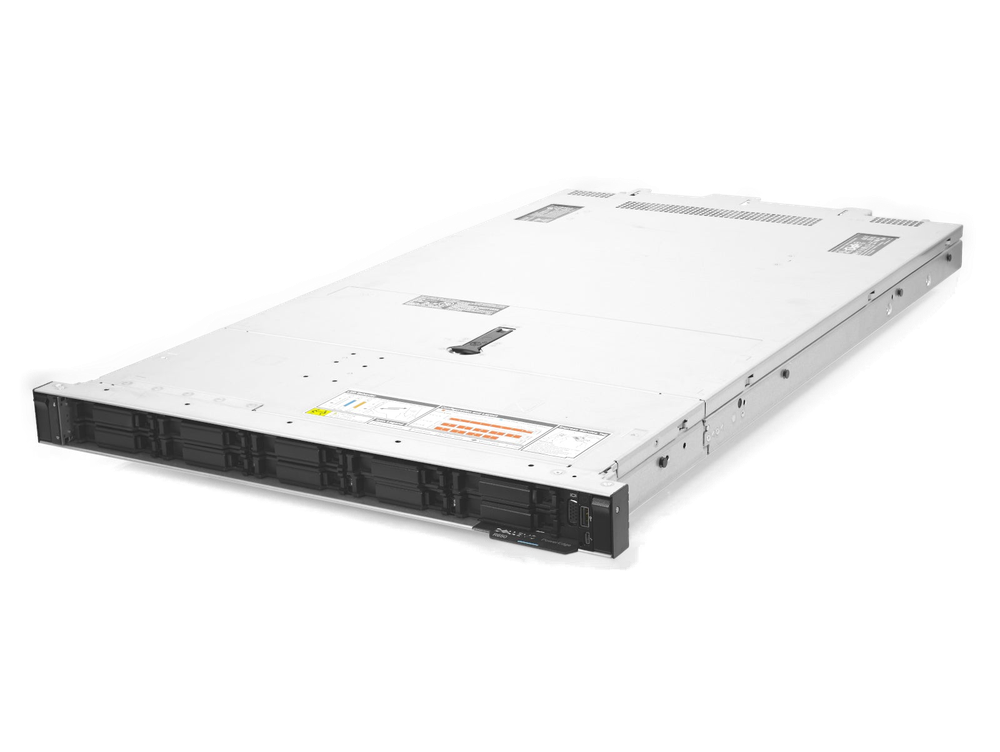
Dell PowerEdge R650 8-Bay NVMe SFF Rack-Mountable 1U Server Chassis
The 8-bay NVMe R650 chassis is a pure NVMe-only chassis that supports hardware-based NVMe RAID with the H755N controller. With all NVMe drives, you’re coupling the highest performance with the lowest latency.
With 2x fewer drives vs. the 10-bay chassis, this configuration is lighter with a maximum weight of just over 42lbs when fully configured.
For anyone having FOMO about those SAS / SATA drives, remember you can always add a rear flex-bay cage (which supports 2x SFF SAS / SATA drives).
If you’re having FOMO for OS-related reasons, then remember that your BOSS card gives you a pair of Dell read-intensive M.2 SATA SSDs designed for that purpose – so you don’t need to.
And if you’re worried about total storage, you shouldn’t be. This chassis supports close to a Petabyte of raw storage capacity BEFORE even adding the optional flex-bay (that’s over 1.2PB when using the flex-bay).
Oh, and did we mention hardware NVMe-RAID?
TechMike’s favorite applications for this chassis would be:
Media
Database
Data mining
File hosting
Website hosting
And if you’re thinking of machine learning as well, so are we!
- Processor
- 2x 3rd Gen Intel Xeon Scalable (Ice Lake), LGA4189, up to 270W
- Max Cores
- 80 (40 per CPU)
 View all Processor specs
- Memory
- 32 DIMMs, up to 8.2 TB DDR4-3200 ECC RDIMM
- Max Storage
- 1.5 PB+ with flex-bay (1.2 PB+ without)
- Drive Bays
- Up to 12x SFF (NVMe, SAS, SATA) or 4x LFF (SAS, SATA)
- Networking
- Embedded 2x 1GbE RJ-45 + OCP 3.0 slot
- Expansion
- Up to 3x PCIe 4.0 x8 slots
- Power Supply
- Redundant, up to 1,400 W
- Form Factor
- 1U rack · Up to 47 lbs
Model overview
The R650 chassis accommodates redundant power supplies supporting total wattage of up to 1,400 Watts. Total storage maxes out over 1.2PBs (yes, that’s Petabytes!) without the optional flex-bay installed. Including flex-bay drives, max storage can exceed 1.5PBs. The Dell PowerEdge R650 chassis is available in various drive configurations supporting up to 12x 2.5” (Small Form Factor / SFF) NVMe, SAS and/or SATA drives, or up to 4x 3.5” (Large Form Factor / LFF) SAS and/or SATA drives.
The Dell PowerEdge R650 server comes with an embedded dual-port 1GB RJ-45 network connection plus an optional LOM / NDC slot that accommodates an OCP 3.0 LOM card (supporting PCIe 4.0 x8). Depending on the riser configuration, the Dell PowerEdge R650 server could take up to 3x PCIe 4.0 x8 (Gen 4) NIC slots.
GPU support
- Up to 3x single-width, 75W GPUs
Key features
- Support for hardware-based NVMe RAID controllers (H755N)
- Hybrid SAS + NVMe drive configurations
- Support for both Boss-S2 and Boss-S1 cards with up to 2x M.2 SATA SSDs
- Quick Sync 2.0 setup / scalability features
- DRAC 9 Dell remote access capabilities
Recommended uses
- General data center standardization
- Virtualization / cloud applications
- Virtual Desktop Infrastructure (VDI)
- Database / analytics
- High Performance Computing (HPC)
- Software Defined Storage (SDS) build-out
- High frequency trading
Configured servers
Build your own configurationLoading server comparison data...
Explore related models
- Previous generation
- Dell PowerEdge R640
- Next generation
- Dell PowerEdge R660
- Equivalent models
- HP ProLiant DL360 Gen 10 Plus
Documentation
Manuals and technical guides for the selected chassis.
- Dell PowerEdge R650 Technical GuideUpdated: June 10, 2026Download
- Dell PowerEdge R650 Spec SheetUpdated: June 10, 2026Download
- iDRAC 9 User's Guide
Dell Integrated Remote Access Controller 9 (iDRAC 9) serves as an out-of-band server management platform that allows IT administrators to remotely deploy, monitor, and troubleshoot infrastructure without relying on host operating systems or installed agents. This controller continuously tracks performance metrics across processor core counts, memory capacity allocations, and PCIe expansion slot utilization while mapping storage options and chassis form factors for rack, tower, and blade deployments. By aggregating these hardware telemetry streams into a composite CUPS index, the platform helps operations teams detect compute bottlenecks or thermal anomalies before they trigger service interruptions.
Security and access control define the operational scope of iDRAC 9, with feature progression across Basic, Express, Enterprise, and Datacenter licensing tiers. The architecture enforces strict authentication through Active Directory, LDAP, smart card validation, multi-factor codes, and role-based privilege levels, alongside FIPS 140-2 compliance and mandatory TLS encryption for all management traffic. Network teams can harden deployments using IP blocking, configurable password strength policies, and dedicated management subnets, while programmatic automation remains accessible through RACADM CLI, Redfish API, WSMan, SSH, and IPMI protocols. Zero-touch provisioning further accelerates bare-metal scaling by automatically delivering Server Configuration Profiles via DHCP options over NFS or HTTP shares.
Beyond identity and network hardening, Dell iDRAC 9 provides comprehensive storage subsystem control, enabling buyers to configure virtual disks across PERC controllers with RAID levels spanning zero through sixty, adjust cache policies, monitor drive wear endurance, and execute cryptographic erasure on SED drives. The management suite includes virtual media mounting, embedded vConsole KVM access, telemetry streaming, and automated firmware lifecycle procedures that support staged updates, rollback mechanisms, and SD-card recovery during catastrophic failures. Ultimately, this solution targets data center operations groups seeking to minimize downtime, enforce regulatory compliance, automate infrastructure scaling, and optimize energy efficiency through power capping and dynamic thermal profile adjustments across large-scale server fleets.
Updated: October 1, 2026Download
Still have questions?
We’re here to help. Tell us what you’re building and we’ll help you configure a Dell PowerEdge R650 that fits your rack and your budget.
Send us a message
A real engineer reads every one of these messages and will get back to you within 24 hours.